
Is 1Password the Sign-In Hub for People and AI Agents?
Disclosure: 1Password is a service offered through SpaceX AI's Grok Bot and Cursor, tools we use. Coldforge is not paid for this or any endorsement.
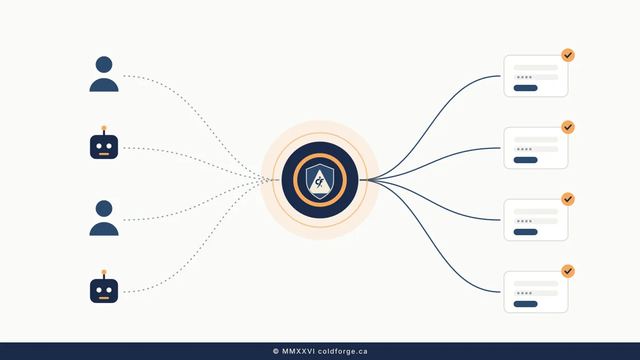
In brief: 1Password isn't replacing Google, but with 1Password for Agents it is making a credible bid to be the neutral sign-in hub for people and their AI agents. You approve each login and 1Password fills it in, so the agent never sees the password. For many small businesses that work across Google, Apple and Microsoft, it is worth a serious look.
What is 1Password for Agents?
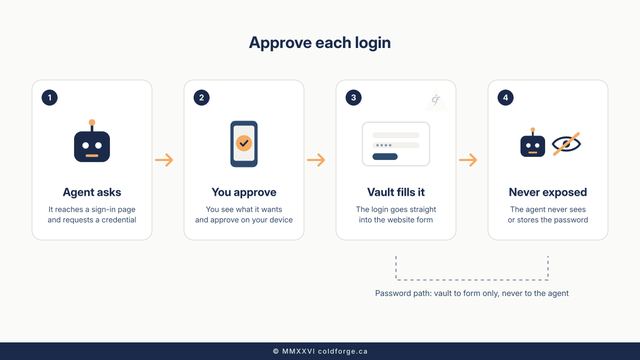
1Password for Agents launched on October 22, 2026. It is a way to give personal AI agents your logins without handing over your passwords.1,2 When an agent reaches a sign-in page, it asks for a credential from your vault. You approve or deny the request on your own device, and 1Password fills the login form directly. The agent sees that access was granted, but never the password or one-time code.2,3
1Password says the feature costs nothing extra on Individual and Family accounts hosted on 1Password.com. Accounts on 1Password.ca and 1Password.eu aren't supported yet, which matters for Canadian users whose accounts are hosted in Canada.4 Some partner agent integrations are rolling out now, and others are listed as "coming soon."1,4
How do AI agents sign in safely?
The safest way for AI agents to log in is for them never to hold your password at all. Pasting a password into a chat prompt gives the agent access that can outlast the task. The better pattern is credential brokering, which handles AI agent credentials in three steps:
- The agent proves who it is. 1Password says each agent verifies its identity with its own unique digital key.3
- A person approves the request. You can see which credential the agent wants and why.3
- The vault fills in the secret. The credential goes straight into the website's form, not to the model.2
Analysis (Coldforge opinion): whoever owns this approval step owns an important checkpoint in the agent economy. "A person approved this sign-in" is far easier to audit and defend than "the bot had the password." By making the feature free on personal plans, 1Password is clearly trying to build the habit early.
Users are divided. In launch coverage comments, some long-time customers objected to any AI being near their vault, while others pointed out that the feature is opt-in and the agent never receives the credential.5 Treat these comments as anecdotal.
What changed in 1Password's 2026 pricing?
1Password pricing went up in 2026:
- Individual: US$35.88 to US$47.88 a year, for renewals on or after March 27, 2026. Family went from US$59.88 to US$71.88.6,7
- Teams Starter Pack: US$24.95 a month, billed yearly, for 10 members (CA$29.95), with up to 10 extra seats at US$4.99 each.8 A price tracker records the base price rising from US$19.95 on July 6, 2026.9
- Business: US$8.99 per user per month, billed yearly. It integrates with Okta, Entra ID, OneLogin and Duo, and supports unlocking with SSO.8
1Password said it had kept prices largely unchanged for years while adding features such as phishing prevention and expanded recovery options.7 Some users have reported looking at Bitwarden or other alternatives since the increase. One reader said they couldn't get past AI-only support when trying to cancel. These reports are anecdotal.5,10
How does 1Password compare with Google, Apple and Microsoft?
The short version: 1Password competes with the big platforms' password managers, not with their workspaces. When people compare 1Password vs Google Password Manager or 1Password vs Apple Passwords, the real question is neutrality versus convenience.
| 1Password | Apple | Microsoft | ||
|---|---|---|---|---|
| Password manager | Core product (paid) | Google Password Manager (free) | Apple Passwords (free) | Built into Edge and Microsoft accounts (free) |
| Platforms | macOS, iOS, Windows, Android, Linux, five browsers8 | Strongest in Chrome and Android | Strongest on Apple devices | Strongest in Windows and Edge |
| Business SSO | Integrates with Okta and Entra ID on Business8 | Workspace identity | Limited | Entra ID is Microsoft's own identity provider |
| Agent sign-in broker | 1Password for Agents (launched Oct 22, 2026)1 | Not assessed | Not assessed | Not assessed |
| Email, docs, calendar | None | Yes | Yes | Yes |
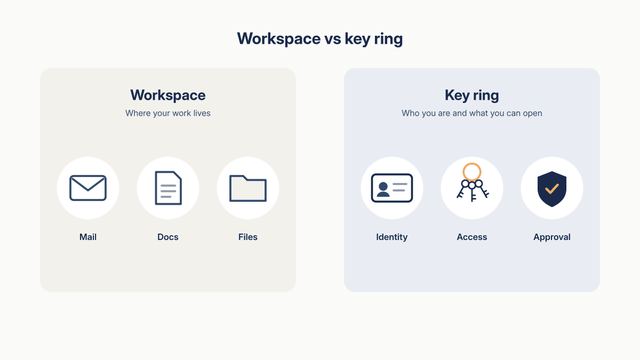
Analysis (Coldforge opinion): Google's power comes from "Sign in with Google." For most people, Gmail is still the root identity that recovers every other account. 1Password has no email, documents or search, so it won't replace that front door. It could, however, become the neutral layer behind it. The biggest risk is that Google, Apple and Microsoft bundle passkey and agent-access tools that are free and good enough. The likely outcome is that Google stays the workspace while 1Password becomes the cross-platform key ring.
Do passkeys and SSO replace passwords for small businesses?
Not yet. They shrink the problem rather than eliminate it. Passkeys for business resist phishing and are worth turning on wherever a site supports them. SSO for small business puts staff sign-ins behind one identity provider, so you can switch off a departing employee's access in one place. Many tools still use passwords, though, and AI agents add a new kind of user. A password manager for small business connects all of these: 1Password stores passkeys, plugs into SSO providers on its Business plan, and now handles agent requests.3,8
Security history matters too. In 2023, an attacker used a session token stolen through Okta's support-system breach to briefly access the Okta instance 1Password uses for employee apps. 1Password shut it down and says no user data was accessed.11,12 We didn't review its outage history for this article.
What should small and mid-size businesses do now?
Is 1Password worth it for small business? It is if your team works across more than one platform and plans to use AI agents. A single-ecosystem shop may find the free tools enough.
- Write an agent-access policy. Require a person to approve every agent sign-in that touches money, payroll or customer data.
- Never paste passwords into AI chats. Use a broker that fills credentials without exposing them.
- Map your root identities. If a critical account recovers to someone's personal Gmail, fix that first.
- Turn on passkeys and SSO wherever your tools support them.
- Price your real headcount. Compare the flat Teams Starter Pack with per-user Business pricing, and recheck at renewal.8
- Test your exit. Confirm you can export your vault and cancel easily before you commit.
- Check where your account is hosted. Canadian-hosted accounts can't use the agent feature yet.4
Planning agents into your operations? See how the Agentic Business Launch approaches it, and talk to Coldforge Agentic Services, reliable by design.
FAQ

Is 1Password for Agents free?
Yes, at no extra cost on Individual and Family accounts hosted on 1Password.com.4

Does the agent ever see my password?
No. 1Password fills the form directly after you approve the request.3

Is 1Password a Canadian company?
Yes. Its launch announcement is datelined Toronto.2

Has 1Password been breached?
In a 2023 incident linked to Okta, an attacker reached an internal Okta instance. 1Password says no user data was accessed.11
Sources
- 1Password blog, "Introducing 1Password for Agents," Oct 22, 2026
- 1Password press release, Oct 22, 2026
- 1Password, agent integrations page
- 1Password Community announcement
- MacRumors, Oct 22, 2026, including reader comments
- The Verge
- 9to5Mac, quoting 1Password's customer email
- 1Password Business pricing
- PriceHiked
- r/1Password thread
- 1Password, Okta incident post
- TechCrunch, Oct 24, 2023